

Apple M4 Mac Mini Desk Setup Upgrade Guide: Front USB-C, Ports & Desk Footprint
With Apple placing front USB-C ports and shrinking the chassis, here is how to arrange your desk cables, hub, and blotter for the new form factor.

Maintained by FindsRadar Editorial Team
Form Factor Shift
5x5 Inch Footprint
Dramatic chassis shrink approaching Apple TV dimensions
Front Port Addition
Dual USB-C + Audio
Eliminates awkward reaching behind monitor risers
Base Memory Baseline
16GB RAM Unified
Finally ends the 8GB memory compression bottleneck
Desk Surface Reclaimed
+45% Space
Freed desk surface accommodates full 85x45cm writing blotters
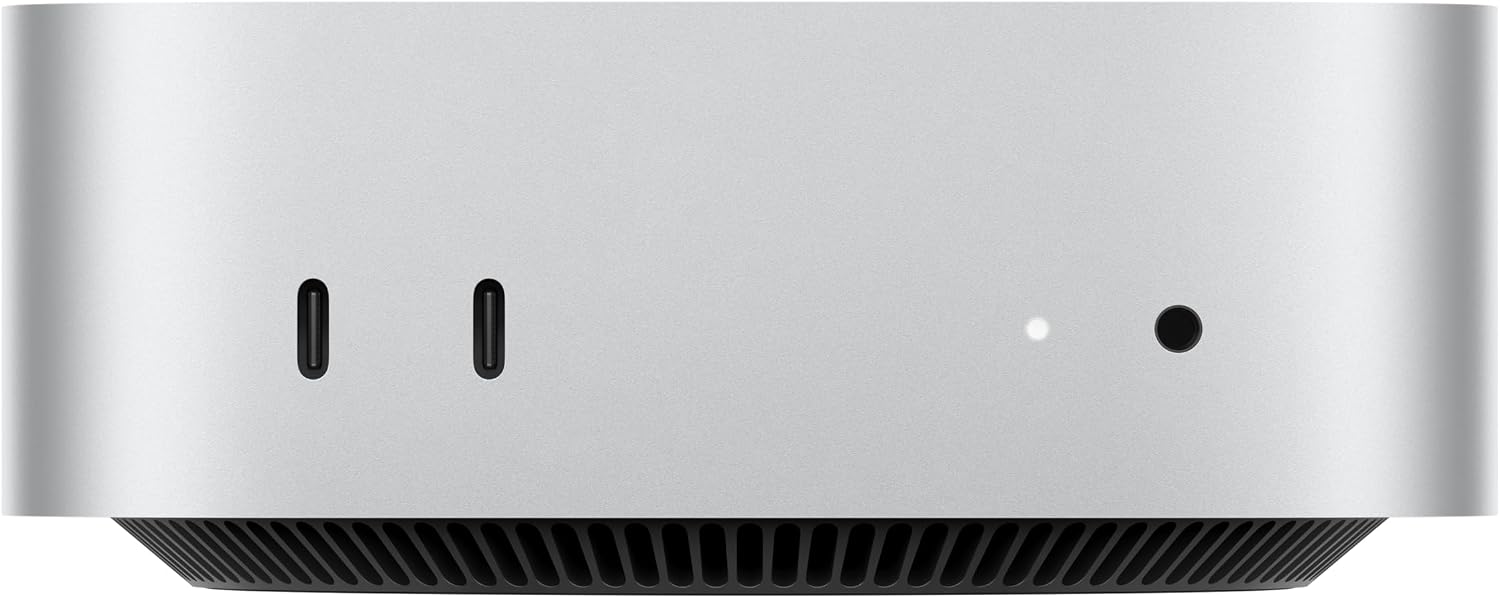
The 2024 M4 Mac mini Redesign: Front Ports and Desk Setup
Apple announced the M4 and M4 Pro Mac mini redesign on 29 October 2024, not in 2026. This guide’s 2026 publication date is not the hardware launch date.
The M4 Mac Mini marks the first radical aesthetic and physical redesign of Apple's budget desktop in over a decade. By shrinking the aluminum footprint down to roughly 5 by 5 inches, the computer transitions from a sprawling flat slab into an ultra-compact powerhouse resembling a taller Apple TV.
The most consequential ergonomic change for everyday workstation users is the addition of two front-facing USB-C ports alongside a 3.5mm headphone jack. For years, Mac Mini owners were forced to either stretch awkwardly behind their machine or clutter their desk with third-party bottom docks just to plug in a thumb drive or SSD.
With the front ports natively available, desk setups require a rethink: how do you keep quick-access charging and data cables tidy without destroying the clean lines of your workspace?
M4 Mac Mini Desk Setup Accessory Matrix
| Accessory / Upgrade | Why It Matters for M4 Mac Mini | Desk Ergonomic Impact | FindsRadar Recommendation |
|---|---|---|---|
| Large Vegan Leather Desk Blotter (85x45 cm) | Cushions aluminum chassis and defines clean mouse/keyboard zone | Eliminates resonance vibrations on hollow wooden desks | DailyObjects Large Mat (p-136) |
| Retractable 6-in-1 Fast Charging Cable | Plugs into front USB-C for earbuds/phone without cord tangles | Reels back into palm-sized disc when not in use | Portronics Snapcase (p-252) |
| Under-Desk VESA Mount Bracket | Suspends the compact 5-inch chassis completely off the desktop | Leaves 100% of tabletop free for writing and peripherals | Universal Mini PC Under-Desk Bracket |
| Monitor-mounted task light | Aims light toward the work surface; check reflections | Verify mounting clearance and USB power requirements | Baseus i-Wok DGIWK-B01 (p-102) |
Solving the Cable Routing Challenge on Minimalist Desks
While front ports are immensely convenient for temporary transfers, plugging in thick, rigid cables permanently will clutter your desk with unsightly cord loops. The solution is using flexible, low-profile retractable cables or silicone right-angle adapters.
Furthermore, ensure the rear thermal exhaust has at least three inches of unobstructed clearance. Despite the exceptional efficiency of the M4 silicon, high sustained rendering and 4K video exports will spin the internal blower fan, venting warm air toward the back.
Pairing the compact M4 Mini with a wide vegan leather blotter isolates any subtle mechanical vibration from the fan and protects both the desk surface and the anodized Apple aluminum from accidental scratches.
Final Assessment & Recommendation
The M4 Mac Mini delivers staggering desktop performance per square inch. With front USB-C ports and a 16GB RAM standard baseline, pairing it with an expansive desk blotter and compact retractable cable creates an immaculate, high-productivity workstation.
What We Liked
- Front-facing USB-C ports eliminate awkward reaches behind monitor risers
- Compact 5x5 inch footprint reclaims massive desk surface area
- 16GB base unified memory provides effortless multi-monitor multitasking
Things to Consider
- Permanent front cable connections can disrupt clean minimalist visuals
- Rear exhaust requires clear perimeter airflow on enclosed desk shelves
Frequently Asked Questions
Editorial answers to common questions. Check the cited sources, applicable region and publication date before relying on product or policy details.
Products Referenced in This Story

DailyObjects Large Vegan Leather & Felt Desk Mat Blotter (85x45 cm)

Portronics SnapCase 2 Retractable Cable & Adapter Case — Black
Sources & image credits
Apple Mac mini M4 from the selected MU9D3LL/A 16 GB / 256 GB US listing, shown from the front. Source product image, not FindsRadar photography, a tested accessory bundle, measured desk-space improvement or a current India offer.
Image: Source product image via Amazon.com / Amazon US image source — Apple Mac mini M4, MU9D3LL/A. Original source bytes, unmodified; full frame retained. Owner-attested Amazon-image reuse permission. Not FindsRadar photography, hands-on testing or verification of a current offer.
Related Stories & Reviews

The M4 Desktop Shift: 6 Essential Amazon Accessories That Solve Apple's Workstation Quirks
Source workspace scene · Props are not the six article accessories or a tested bundle.
9 min read
USB-C hub or dock? Start with your setup
Anker A8380 category example · Not Belkin INC027; pictured peripherals are not verified box contents.
6 min read